
Devops training in hyderabad
Welcome to Educalf Software Training Institute, where we turn aspirations into achievements. With a focus on cutting-edge technologies and industry-relevant skills, we’re dedicated to nurturing the next generation of IT professionals.
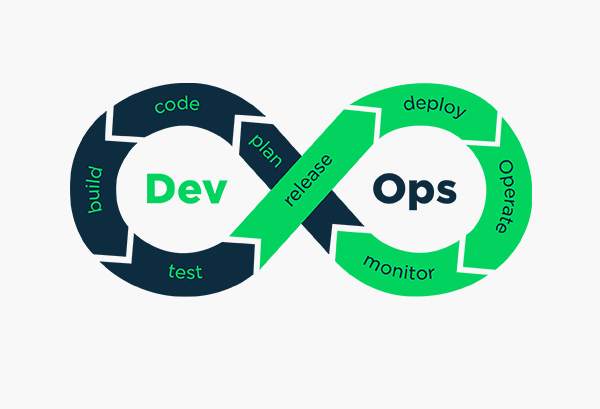
Devops training in hyderabad
COURSE CONTENT
- Don’t just learn tools, Learn to implement them in Real Time.
- Don’t just write “Hello world” programs. Write the automation code like a professional and Do it like a Real timer.
- Automate the entire infrastructure implementation.
- Learn Continuous Integration and Continuous Delivery as it’s done in Real Time.
- We will cover 7 major Real-time scenario-based Automation projects with the Help of CI / CD.
DevOps Life cycle
- Push code
- Fetch Changes
- Run Unit Tests
- Build Artifacts
- Storing Artifacts
- Provision Environments
- Deploy your Builds
- Run Load and Functional Tests.
DevOps Introduction
- Understanding Development
- Development SDLC : Waterfall & Agile
- Understanding Operations
- Dev vs Ops
- What is DevOps
- DevOps SDLC
- Continuous Delivery model
- DevOps tools for DevOps SDLC
- DevOps Roles & Responsibilities
LINUX ( OPERATING SYSTEM)
- Linux Introduction, Principles
- Command line utilities & Basic commands
- Booting Process.
- Linux Filesystems and partitioning
- Text Editors (VIM)
- Filters & I/O Redirections
- Users & Group administration
- File permissions & Ownerships
- Networking commands
- Software Management: Yum and RPM.
- Useful tools: ssh, scp , ping.
- Service & Process management
- Systems and HW stats.
- Job scheduling (Cron and at )
- Process management.
- Managing Installed Services.
- Performance Tuning.
Amazon Web Services (AWS)
- Creating a Free Account
- Setting Up of E2 Instances using different OS.
- Connecting to and Working with EC2 Instances
- VPC
- SUBNET
- INTERNET GATEWAY
- ROUTING TABLE
- SECURITY GROUPS
Vesion Control System with GIT
- Version Control System
- Centralized Version Control System
- Distributed/Decentralized Version Control System
- Advantages of GIT
- GIT Workflow
- Installing GIT
- Local Repository
- Working Directory and Staging Area or INDEX
- GIT Bash Commands
- Creating a Local Repo
- Configuring Local Repo
- Creating Files (using Nano/Vim/Atom Editors)
- Adding Untracked Files to Staging Area/INDEX
- Committing to Local Repo
- Check Status of Files
- Check Logs
- Ignoring temp/unused files
- Creating Account in GITHUB
- Creating Remote Repo in GITHUB
- Copying URL
- Setting up Remote URL on Local Repo
- Pushing Local Repo to Remote Repo
- Cloning Remote Repo
- Working with Cloned Repo
- Branches
- Cloning Remote Repo
- Working With Remote Repo
- Use of Branches
- Listing, Creating and Deleting Branches
- Working with Branches on Local Repo
- Creating/Modifying Files,
- Staging and Committing in Branches
- Pushing Branches
- Working with Branches on GIT HUB
- Creating a Pull Request
- Reviewing & Approving Pull Request
- working with No-Conflicts
- Merging to Master
- Deleting Branches on GIT HUB
- GIT Pulling, Fetch and Push Operations
MAVEN ( BUILD TOOL)
- Introduction to Maven
- Installing maven
- Maven with Java based projects with project object model.
- Analysis of POM.xml
- Validating POM.xml
- Maven life cycle (default, clean, site)
- Working with Maven goals
- Generating war/jar/ear file
- Generating reports.
- Integrating with Jenkins , SonarQube , NEXUS.
TOMCAT (WEB SERVER)
- Installation and Setup
- Deploying war files into TOMCAT
- Creating users in TOMCAT
- Changing port number of TOMCAT
- Starting and Stopping the TOMCAT service
- Integrating with Jenkins for automatic deployments.
JENKINS (CONTINUOUS INTEGRATION AND CONTINUOUS DELIVERY / DEPLOYMENT TOOL)
- Introduction to Jenkins Build Automation
- Installing and Configuring Jenkins
- Creating and working with Free Style Projects
- Introduction to continuous integration.
- Build & Release and relation with DevOps
- Understanding deployment and developers
- Why Continuous integration
- Jenkins introduction and setup
- Jenkins projects/jobs
- Jenkins plugins
- Jenkins administration:
- Users
- Nodes/slaves
- Managing plugins
- Managing software versions
- Configuring Jobs
- SCM
- Building Triggers
- Git Hub Web Hooks
- Executing Shell Script
- Post Build Actions
- Maven Project creation, configurations and Builds
- Build Pipe Lines
- Pipe line as a code
- Declarative Pipeline
- Scriptive Pipeline
Ansible AUTOMATION (CONFIGURATION MANAGEMENT TOOL)
- Ansible
- Configuration Management & Automation
- What is Ansible & its features
- Ansible setup on local & cloud
- Understanding Ansible architecture & Execution
- Inventory
- Ad hoc commands: Automating change Management with Ad Hoc commands
- Playbook Introduction
- Ansible configuration with ansible.cfg
- Ansible documentation
- Modules, modules & lots of modules
- Writing playbook for webserver & DB server deployments
- Tasks
- Variables
- Templates
- Loops
- Handlers
- Conditions
- Register
- Debugging
- Ansible Roles
- Identify server roles
- Roles structure
- Creating, Managing and executing roles
DOCKER (CONTAINERIZATION)
- Introduction to Virtualization and Containerization
- Installing Docker Engine
- Docker Fundamentals
- Working with Images
- Creating New Images and Exporting to Docker Hub
- Find Images
- Download Images
- Remove Images
- Working with Images
- Creating, Configuring and Managing Docker Containers
- Installation and Set Up of Webservers like Apache, Tomcat, Nginx in Docker Containers
- Installation and Launch of Jenkins in Docker Container
- Creating New/Customized Images from an existing container/image
- Move, Backup and Restore Images
- Docker Integrating with Jenkins
SonarQube ( CODE QUALITY TOOL)
- Why SonarQube and purpose of SonarQube
- Installing and setup of SonarQube
- Continues Inspection of Code.
- Code coverage of the java code
- Code reviewing the java code
- Bugs, vulnerabilities and code smiles
- Quality Gates
- Major issues, minor Issues and Blocker Issues
- Integrating with Jenkins
Nexus (Artifactory)
- Why Nexus and Purpose of Nexus.
- Installation and setup of Nexus
- Creating the repositories in Nexus
- Updating the repositories information in POM.xml
- Creating the users in Nexus
- Integrating with Jenkins
- Taking the Backup of war files.
KUBERNETES (container orchestration tool)
- What is Kubernetes and Purpose of Kubernetes.
- Kubernetes Architecture.
- Configuring the Kubernetes cluster
- Installing the Kubernetes and setup of k8’s Master and Worker Nodes.
- Creating pods
- Creating services
- Creating deployments
- Creatiing Replica Sets.
- Kubernetes Integrating With Jenkins
- Kubernetes as Pipeline as a code.
BASH – SHELL SCRIPTING
- Shell scripting for scenario based like
- HOW TO FIND LOG FILES AND DISPALY ERRORS AND EXCEPTIONS
- DISPLAYING CONTENTS OF A FILE
- TO CHECK WHEATHER THE FILE EXISTS OR NOT
- HOW TO FIND FILES/DIRECTORIES WHICH ARE OLDER THAN X DAYS
- SCRIPT FOR PINGING OTHER SERVERS AND MAILING IF THEY ARE UN REACHABLE
- SENDING EMAIL WHEN MEMORY IS LESS
- SENDING EMAIL WHEN DISK SPACE IS LESS
- SENDING EMAIL WHEN MEMORY IS LESS
Ticketing Tools
- JIRA
- REMEDY
Monitoring Tools
- Cloud Watch
- NEW RELIC
JOB SUPPORT
- AQ’s
- Resume Preparation
- Placement Assistance
- Forwarding resumes to companies
- Interview Crack level
Sitecore Training Online Fees
SELF PACED LEARNING
₹ 14950
- Duration: 20 Hrs
- Lifetime Free Upgrade
- Reference Documents
- 24*7 Support & Access
ONLINE CLASS ROOM PROGRAM
₹ 14950
- Duration: 20 Hrs
- Lifetime Free Upgrade
- Reference Documents
- 24*7 Support & Access
CORPORATE TRAINING
- Customized Training Delivery Model
- Flexible Training Schedule Options
- Industry Experienced Trainers
- 24x7 Support
Overview
- Educalf Trainers Having a minimum 6+experienced to maximum 12+years and can provide In depth and up to date knowledge in all technologies and passion to TEACH and SHARE knowledge.
- Real-time examples for each and every topic.
- Huge web resources to help you in future web projects.
- Free study material for all the topics, lots of examples and projects.
- Placement Assistance for students after completion of course through SSPC (Educalf placement cell).
- Educalf not only teaches you just theory but gives assignment training on real-time
- Requirements and Project Oriented Training with project management skills.
- We provide interview questions & answers, mock interviews, and 100% placement assistance.
Key Features
- Interview Question/Answers
- Real Time projects
- Job oriented Intense Subject
- 100% Job assistance
- 24/7 Chat/Call support
- LifeTime Job Opening updates
- Endless Learning Journey
Contact Us - 24/7
+91 8500115592
India
+91 8500115592
India
+91 8500115592
India
educalf129@gmail.com

Certification
Upon successful completion of the course, you will receive a certification from Educalf Software Training Institute, recognized and valued by leading companies in the industry. Our certifications validate your skills and make you stand out in the job market.
Course FAQ
You May Also Like


Trusted By Top Companies Worldwide




Course Reviews
-
 Ramana Student
"I recently completed the Web Development course at Educalf Software Training Institute, and I'm beyond impressed. The curriculum was comprehensive, covering both front-end and back-end technologies. The instructors were not only experts in their field but also excellent teachers. Highly recommended!"
Read more -
Suman Student
"The Data Science program at Educalf Software Training Institute exceeded my expectations. The instructors were passionate about the subject and provided in-depth insights into complex concepts. The course structure was well-organized and the real-world applications made all the difference. Thank you, Educalf, for a transformative learning experience!"
Read more -
Vivek Student
"I completed the Cybersecurity Certification program at Educalf Software Training Institute, and it was a game-changer for my career. The institute's focus on hands-on labs and simulations made all the difference in grasping complex security concepts. I'm now working in a security role and I owe it all to Educalf. Thank you!"
Read more -
Manasa Student
"The DevOps course was a game-changer for my career. The content was well-structured and the labs provided hands-on experience with industry tools. The instructors were top-notch and were always willing to help. Thankyou Educalf!"
Read more